Con l’arrivo già da qualche anno dei televisori a schermo piatto di grandi dimensioni e con gli amplificatori home theatre oggi è possibile ricreare il cinema nel salotto di casa. Il Dolby Surround senza fili è un sistema audio che permette di decodificare il sonoro di un film per ricreare l’atmosfera cinematografica.
Esplosioni, effetti sonori ed il parlato degli attori vengono vissuti in maniera “realistica” dallo spettatore offrendo un’incredibile esperienza sonora.
Sul mercato ci sono parecchi modelli che vengono venduti con prezzi che oscillano tra 200 e 1000 euro. La differenza la fa la qualità audio, la potenza e la bontà del prodotto che acquistiamo. Un sistema Dolby surround senza fili è composto da:
- amplificatore con chip integrato di decodifica
- una serie di diffusori collegati in modo wireless all’ ampli
- un eventuale lettore blu ray
Indice
Migliori modelli
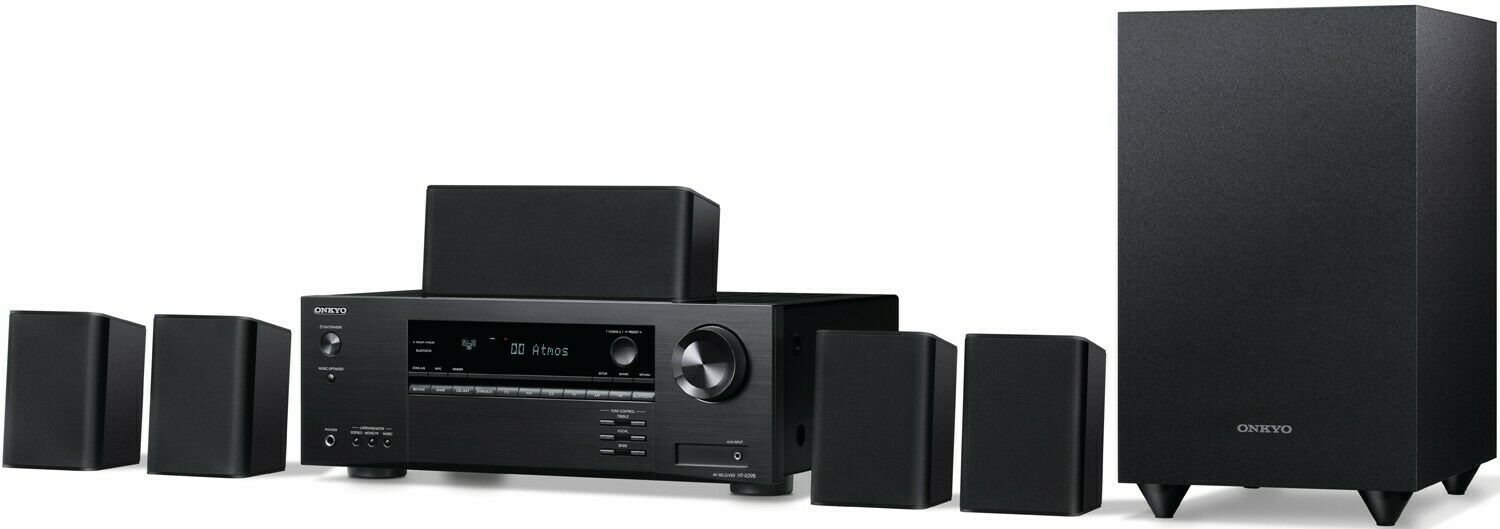
il sistema della giapponese ONKYO è qualcosa di sorprendente dal punto di vista della qualità sonora. E’ un impianto 5.1 composto da subwoofer, doppia coppia di speaker laterali e diffusore centrale. Potenza di ogni cassa è di 120 watt. Supporta tutti i tipi di decodifica audio per film come Dolby Atmos, Dolby Surround, DTS:X, DTS Neural:X, Dolby TrueHD, DTS-HD Master Audio, 4K Ultra HD, Dolby Vision, 3D Video, ARC (Audio Return Channel). Il sitema può essere ben utilizzato anche come impianto hi-fi.

Price: ---
0 used & new available from

Yamaha NSP41 - Set di Altoparlanti Homecinema 5.1, Colore: Nero
Price: 257,00 €
10 used & new available from 242,58 €
il sistema Sony S40R è ancora una volta un 5.1 con soundbar frontale comprensivo di connessione bluetooth, subwoofer e caffe da pavimento. Connessione wifi per l’utilizzo di audio in streaming da servizi come Apple Music e Spotify. Un gran bell’impianto, ottimo compromesso prezzo qualità audio.
Se avete la possibilità di spendere un po’ di più orientatevi con tranquillità sul Sintoamplificatore Yamaha RX-V4A . La casa giapponese ha una solida esperienza nel campo dell’ amplificazione audio e nei sistemi home theatre. Questo sintoamplificatore con radio ha una qualità audio eccezionale. Supporta la tecnologia HDCP 2.2 di protezione copyright per la trasmissione dei contenuti in 4K. Supporta anche l’HDR (High Dynamic Range). Da abbinare il set di casse della stessa YAMAHA.

Price: 423,17 €
40 used & new available from 385,00 €

Che cos’è il Dolby Surround
Si tratta di un sistema di decodifica dell’ audio brevettato dai Dolby Laboratories. Un segnale audio, ad esempio quello di un film, viene “diviso” in più canali ad ognuno dei quali viene assegnato un effetto sonoro. Avremo solitamente un canale centrale delle voci, due frontali e due laterali, il tutto per “avvolgerci” e rendere più viva l’esperienza audio di un film.
Il DOLBY SORROUND fu introdotto a fine anni 70 nei cinema, ora nella sua versione digitale si chiama DOLBY DIGITAL e ha subito trasformazioni, frutto di evoluzioni, nei nomi, Dolby Atmos, Dolby Sorround EX, Dolby Prologic.
Alla base c’è sempre lo stesso concetto, la divisione della colonna sonora di un film o di un videogioco in differenti canali per rendere più viva l’esperienza. I numeri del sistema, ad esempio 5.1 oppure 7.1 indicano il totale degli speaker impiegati nel sistema di riproduzione audio.
Dolby Atmos
il Dolby Atmos ha iniziato a farsi strada nei sistemi home theatre alcuni anni fa. Ora è praticamente standard negli impianti con sette o più canali. Questo formato “basato sugli oggetti” assegna un canale audio a posizioni specifiche nella tua area di ascolto per corrispondere a dove si sarebbero verificati naturalmente nello spazio reale. Ciò aggiunge una sensazione tridimensionale alle immagini bidimensionali sullo schermo.
Potremmo quindi avere una configurazione 7.1 così fatta:
- uno speaker centrale per le voci
- un subwoofer per i bassi da piazzare in qualsiasi punto della stanza
- due speaker centrali per gli effetti e voci
- due speaker laterali per gli effetti e voci
- due speaker posti sul soffitto per voci ed effetti che vengono dall’alto
I ricevitori con decodifica Atmos hanno almeno sette canali. Più canali ti offriranno maggiori opzioni di configurazione. Ad esempio, con un ricevitore a nove canali, è possibile configurare un sistema 5.1.4 o 7.1.2.
Virtual Sorround
è un sistema di elaborazione di segnale DOLBY “simulato”. Viene utilizzato nelle cuffie surround. Le cuffie Dolby ti consentono di goderti fonti sonore multicanale come i film Dolby Digital o Dolby Surround che includono effetti sonori realistici ed emozionanti. Fonti sonore stereofoniche, dai CD ai file MP3.
Quando il suono di ciascun diffusore di un impianto stereo raggiunge l’orecchio interno, acquisisce un insieme di impronte spaziali sia dall’acustica della stanza che dalle proprietà fisiche della testa e dell’orecchio esterno . Queste impronte spaziali consentono al cervello di localizzare il suono e integrarlo in un campo sonoro in cui gli artisti sembrano essere di fronte a te, proprio come in una sala da concerto.
Da parte loro, le cuffie inviano il suono direttamente ai timpani, senza che sia arricchito dalle impronte spaziali acquisite da una riproduzione su altoparlanti.
Quando ascolti il tuo canale o home theater, le tue orecchie ricevono sia il suono diretto da ciascun diffusore sia i riflessi multipli da pareti e mobili.
Quando raggiunge le tue orecchie, il suono di ciascun diffusore ha acquisito una firma unica. Nel loro insieme, queste firme informano il tuo cervello delle dimensioni e delle proprietà acustiche della stanza, della posizione dei diffusori e delle proprietà spaziali del suono originale.
Surround 7.1
L’audio surround a 7.1 canali aggiunge due altoparlanti surround posteriori aggiuntivi alla configurazione standard degli altoparlanti 5.1. I dischi Blu-ray hanno spazio per più informazioni audio rispetto ai DVD, quindi possono essere codificati con formati audio 7.1 per un suono surround senza perdita di qualità.
Formati a 7.1 canali
Dolby True HD
- Offre fino a 7,1 canali di audio lossless (non compresso)
- Identico alla registrazione master originale dello studio cinematografico
- Effetti più precisi
Audio master DTS-HD
- Come Dolby TrueHD; fornisce 7.1 canali discreti di audio lossless
- Identico alla registrazione originale dello studio cinematografico
Dolby Pro Logic IIx
- Come Dolby Pro Logic II; utilizza un’elaborazione speciale per il mixaggio di segnali audio a due o cinque canali al suono surround 7.1
Dolby Digital Plus
- Fornisce effetti sonori più dettagliati rispetto a Dolby Digital 5.1, sebbene non sia privo di perdite come Dolby TrueHD
DTS-HD
- Più dettagliato dell’originale 5.1 DTS, ma non senza perdita di dati come il DTS-HD Master
Che cos’è il DTS concorrente di DOLBY
È sotto questo nome che è apparso il concorrente diretto di Dolby Digital. La società DTS offre da tempo un processo di codifica a 5.1 canali che funziona secondo lo stesso principio di Dolby Digital, ma con una qualità del suono che dovrebbe essere molto più elevata. Troviamo lo stesso numero di canali con le stesse specifiche tecniche, l’argomento di DTS è che l’operazione matematica di compressione dei dati digitali è molto meno importante. Una minore compressione implica una migliore qualità, perché le perdite derivanti da questo algoritmo sono minori.
Significa anche che il segnale digitale DTS occupa più spazio di quello di Dolby. Come nel Dolby Digital, troviamo il segnale DTS su formati digitali come bluray e videogiochi. Avrai assolutamente bisogno di un amplificatore con un processore di decodifica DTS per ascoltarlo correttamente.
Sistema economico Dolby Surround 5.1 senza Fili
E’ evidente che non tutti possono permettersi sistemi da piú di 1000 euro. Se il vostro budget è limitato possiamo comunque creare un sistema sonoro audio degno di questo nome senza spendere cifre folli.
QUESTO SET DELLA LOGITECH costa poco ed è ottimo per la sua qualità audio. Suono nitido e bassi profondi che provengono dal subwoofer. Le voci del canale centrale sono molto chiare. Il sistema offre anche molti modi per collegarsi ad una sorgente audio. Porta da 3,5 mm, cavi RCA, 6 canali diretti, 2 slot digitali ottici, digitale coassiale.
Può essere utilizzato con un lettore bluray, con un PC, ma anche per ascoltare musica tramite smartphone. Inoltre viene fornito con tutti i cavi degli altoparlanti necessari per la configurazione.
Sebbene le sue connessioni e decodifica non riescano a soddisfare i formati audio HD come Dolby True HD o DTS HD Master Audio HD, il sistema di Logitech può decodificare normali flussi di bit Dolby Digital e DTS attraverso gli ingressi digitali.
Gli altoparlanti vantano una gamma di frequenza di 35 Hz e 20 kHz e ognuno è dotato di un driver di fase in alluminio lucidato da 3 pollici.
